Voice assistant that answers the phone & books meetings
Answers inbound calls, handles the conversation, checks the calendar, and books — escalating when it should.
The problem
A missed call is often a missed customer. After-hours and overflow calls go to voicemail, and scheduling turns into a back-and-forth. But a phone agent that mishears a date or books the wrong slot erodes trust faster than no agent at all.
What it does
- Answers an inbound call and greets the caller.
- Understands what they want — a question answered, a meeting booked, or a person reached.
- Checks live calendar availability and proposes real open slots.
- Books the meeting and sends a confirmation by SMS or email.
- Escalates to a human (or takes a message) the moment a request is sensitive or it isn't sure.
How it’s built
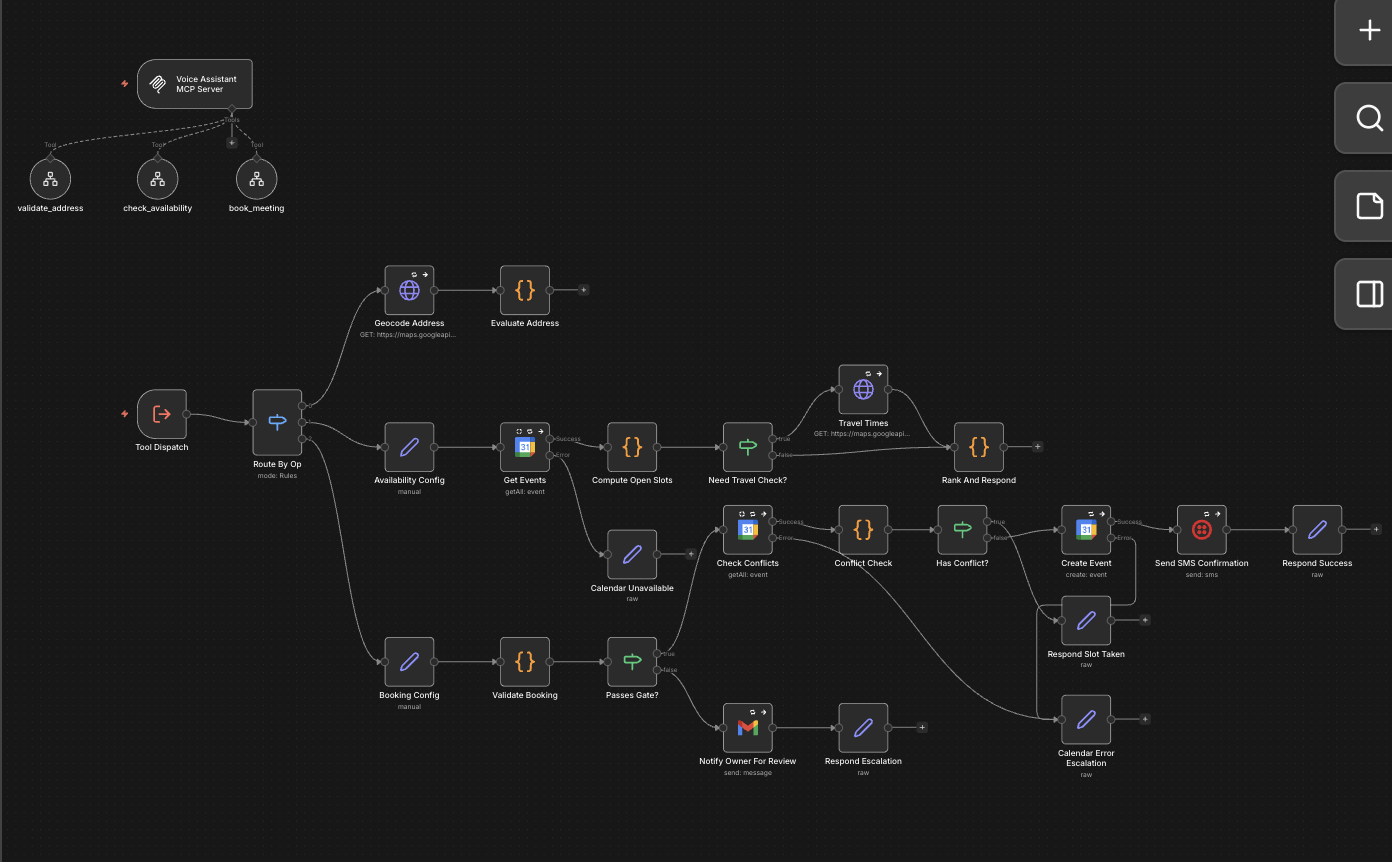
- 1Call comes in; audio is streamed to speech-to-text.
- 2The LLM dialog manager interprets intent and drives the conversation.
- 3Tool call: check_availability against the live calendar.
- 4Booking details (date, time, attendees, purpose) are validated before anything is written.
- 5Tool call: create_event, then a confirmation is sent. If understanding or the calendar fails, the call is handed to a human or a message is taken.
See it in action
A representative example of input and the validated output it produces.
Caller: Hi, can I get a 30-minute consultation
        sometime Thursday afternoon?
Agent: I have Thursday at 2:00 or 3:30pm — which works?
Caller: 3:30 is great.
Agent: Booked. Can I text the confirmation to this number?{
"intent": "book_meeting",
"validated": {
"date": "2026-06-25",
"start": "15:30",
"duration_min": 30,
"type": "consultation",
"confirm_via": "sms"
},
"confidence": 0.96,
"action": "create_event + send_sms_confirmation",
"escalate_to_human": false
}The guardrails applied
This is what separates a demo that works once from a system a business can leave running.
Confidence-gated human review
Ambiguous, sensitive, or out-of-scope requests are handed to a person — the agent never guesses on details that matter.
Structured output validation
Date, time, and attendee details are validated against a schema before any event is written to the calendar.
Fallback and escalation paths
If speech is unclear or the calendar is unreachable, the call degrades gracefully to taking a message or transferring to a human.
Cost ceilings
Per-call token and duration limits keep spend bounded and stop a stuck call from running indefinitely.
Eval suites with pass thresholds
Tested against a scenario set — accents, interruptions, edge-case intents — and held to a pass bar before going live.
Want this built for your workflow?
Tell me the task and what an error would cost. I’ll scope a version held to the same standard.
Request a reliability audit